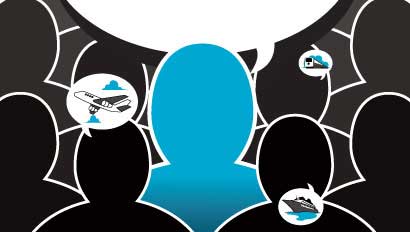
 Less than 10 seconds. That's the amount of time your content has to grab the attention of busy social media users.
Facebook news feeds and Twitter streams are a crowded space of photos, links, status updates and sponsored ads. Each day, Facebook users upload more than 350 million photos and click the Like button 2.7 billion times. That's insane!
Twitter is no different. On average, there are more than 400 million tweets per day. Follow a lot of people, and the Twitter stream can become a highway of tweets streaming at 90 mph. Does anyone really read every single tweet?
Somewhere in that sea of noise lies your content waiting to be loved with a Like, share, comment or retweet. In a matter of seconds, each person in your audience makes a decision either to stop and engage or to scroll right on by.
When a photo can't tell the story, text is still king. Likable, shareable content is the foundation of a socially engaged community of loyal followers. If your social media pages are like a ghost town, it's time to build a better strategy.
Social media used to be about relationships. Unfortunately, much of it has become blasting messages that have no value. Put yourself in the shoes of your fans. What do they need or want? What problems do they encounter that you can help solve? Once you understand their needs and create and share relevant content, they'll not only read but share and engage.
When you write, be informative. Inspire and educate. Include the appropriate keywords in the title and first paragraph of your content.
Tricks of the trade
CopyBlogger.com recommends that every sentence be written with one goal in mind: Get the reader to the next sentence. Add actionable statements when appropriate and choose photos that create visual interest and tell a story. Write at least 300 words. Anything less will be excluded from Google search results. Everything you write should also be on your website. As you post content on your social media pages, post an excerpt directing readers back to your website to read the entire article.
Quality content will increase your readership and your website traffic. Newsletter opt-ins can increase from people seeking your travel expertise. Most importantly, with a few social media tips, you'll begin to rank higher in Google search results.
If you have a business page on Facebook, you know that fans rarely return to the page itself to read updates. Most business updates are read in the news feed. Have you ever wondered why some fans see your posts and others don't?
Meet EdgeRank, Facebook's algorithm for determining what's shown in the news feed. Pages with a higher EdgeRank score are more likely to have their updates added to the news feed than pages with a lower score.
Understanding EdgeRank
Your score is determined by a number of engagement factors. EdgeRank looks at the relationship you have with each fan and assigns a score based on how often that fan likes, shares, comments or clicks on your content.
 Interactions that require the most effort, like a comment, receive higher marks than those that take little effort, such as clicking "Like." EdgeRank also looks at the types of posts made (photo/video, links, text only) and the number of interactions each type receives, then assigns a score to that.
Finally, EdgeRank looks at the age of the post. The older the post, the less relevance it might have. The combination of scores is your EdgeRank score. Check your Facebook page's overall EdgeRank score for free at www.edgerankchecker.com. While it's not perfect, it is a good indicator of your engagement level with your fans.
A good EdgeRank score opens the door to spread your message further. Your updates will be shown to more of your fans, offering more opportunities for engagement and increased website traffic.
Speaking of websites, share content from your website and other relevant sources whenever possible. Your website is the one place that isn't subject to Facebook restrictions. If your EdgeRank score is lower than you'd like, review past posts to understand what your fans love and what they don't. The simple rule is: Create more of what they love.
Consider adding Facebook comments to your website. Any comments made on your website appear on the Facebook user's wall, giving you greater exposure. It also clearly identifies commenters on your website by pulling in their Facebook photo.
The art of YouTubing
Earlier this year, YouTube introduced the YouTube Creator Academy, a six-lesson course offering tips and strategies to create better YouTube videos and increase channel engagement. One of the lessons in the Creator Academy revealed how YouTube decides which videos will show up in search results.
In the past, the number of views a video received determined its rank and how it was found in a search. Going forward, YouTube is serving up videos ranked by how much time people have spent watching them. Measuring time rather than number of views is a better gauge of the quality of the content.
YouTube is not alone in this shift. The emphasis is moving from simple measures like views (which can be bought) to quality of the content (something you can't buy).
Consider a two-minute video that's been viewed 1,500 times. If 80% of viewers stop watching after 10 seconds, it probably wasn't a great video. Today, creating inspiring content that people will watch all the way to the end is crucial to your YouTube channel's success.
There are several factors that can affect video watch time. Obviously, you'll want great content, but here are a few other things that factor in to reducing watch times:
- Bad sound. External microphones are not optional. If you're counting on your camera's built-in mikes and the audio sounds like you are far away or produces an echo, you need an external directional microphone.
- Poor video quality. Invest in a good camera that offers HD options. Use a tripod or Steadicam stabilizing device to eliminate some of the shake, if necessary.
- Bad lighting. It's never a good idea to take a video in low-light settings without some form of supplemental illumination.
- Distracting surroundings. Before you click record, take a look around. Is there anything behind you that has the potential to distract viewers from your message? Look for simple surroundings that offer some visual interest.
While social media is an important part of your engagement and content strategy, your website is the most crucial component. Google+ is the one social network that can make a huge difference in how your website is found in search results.
The power of Google+
Google+ is now the second-largest social network, outpacing Twitter and YouTube. Website content shared here is indexed and visible in search results much faster than content that isn't. As people engage with your post, Google ranks your content a bit higher in organic search engine results. The first sentence of your post will become the title when it's listed in Google+, so it's really important that the first sentence includes keywords.
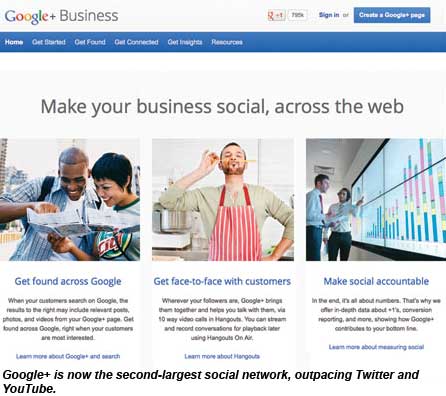 Get started by creating a personal Google+ profile. Complete every section, including adding your website under "Links" and inside your profile introduction itself. Consider adding links to different pages of your website (i.e., booking engines, blogs, etc.). Do you create for others? Include links to those websites under "Contributor to." Taking this first step in linking your Google+ profile to the content you create will reap huge benefits.
If you've done a Google search lately, you might have noticed author photos displayed next to content. It's a direct benefit of establishing Google Authorship, and it immediately differentiates you from the competition.
Authorship is simply identifying yourself to Google as an author of content. Once completed, you might see a slight boost in organic search engine rankings. Be sure the photo you've uploaded to your Google+ profile is what you want to appear in search results. Establish your authorship here: https://plus.google.com/authorship.
As your content gains popularity, Google recognizes you as an author of great content. The reward is better placement in organic search results for all of your content, resulting in more traffic making its way to your website.
We're all familiar with the Facebook Like button; Google+ offers a similar button for people to like content. It's called the 1+ button, and it works the same way but with bigger benefits. Install the Google 1+ button on your website next to your other social media icons. The more 1+ clicks you receive, the better chance that your website will appear higher in organic search results.
Establish a Google+ business page and share content there, as well. Encourage your clients to recommend your business and share reviews about their experience with you. Include links to your travel blog and your best keywords in the About section. The more authentic your business becomes, the better. You'll soon notice your Google+ business page showing up in search results.
The key to Google+ success is becoming an active user. Google+ communities function much like Facebook groups. Find communities that share your passion, or start one of your own.
Shared "circles" are another way to connect with professionals or potential group leaders. A Google+ circle is similar to a Facebook friend list. People create circles and often share them with others. There are circles for scrapbookers, authors, WordPress users, photographers, New York Times writers -- the list goes on and on.
Shared circles are a great way to source group leaders or even ideas for potential groups. You can find shared circles by doing a simple Google search for "spreadsheet of Google+ shared circles." You'll find a wealth of resources for anything from foodie groups to reporters, CEOs and more.
Pin your success to this
Pinterest, the world's first visual social media platform, is not based on people but things. Since its launch, Pinterest has become a major source of website traffic for businesses that use it effectively. Remember, the goal with any social media platform is to send traffic back to your website.
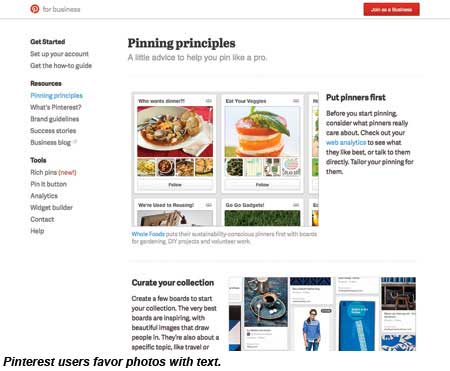 The engagement on Pinterest is all about "repins," which are analogous to a share. More than 80% of the activity on Pinterest is repins. Being a content creator is a great opportunity for travel professionals because of the access we have to travel photos and videos.
Get started by creating a business page at http://business.pinterest.com. Verify your website so other Pinterest users know you're a trustworthy source. You may need the assistance of your website provider to complete verification. Add the Pin It button to your website. The Pin It button enables people to pin photos from your website with ease.
Once your page is set up, start thinking visually. Again, it's about great, engaging content. Find photos that tell a story. Remember, Pinterest is a network of things, not people. Photos with a central focal point and simple backgrounds work best. Long, vertical photos tend to get more repins than wide, horizontal images.
Add titles on top of your photos with an image-editing software like PicMonkey.com. Photos with text get repinned and clicked more often than those without a photo.
Before you pin a photo, add it to your website as part of a photo gallery. If your website doesn't support a photo gallery, create a blog post as a photo tour.
If you upload photos directly into Pinterest and not to your website, be sure to go back and link the pinned image to the appropriate page on your site. Many travel professionals miss this opportunity to steer traffic to their websites by simply pinning photos to Pinterest and not linking them anywhere. As your photos are repinned and your Pinterest followers engage by clicking through to your website, you'll see your website traffic skyrocket.
From this point on, the name of the game is engagement and quality content. Build a community of socially engaged followers using your new social media knowledge to do more than post meaningless messages. It's an unprecedented moment in time where social media has leveled the playing field for anyone willing to get in the game by creating and sharing great content.
Your challenge now is to cut through the noise.
Margie Jordan is the CEO of Jordan Executive Travel Service and a self-professed social media geek. She is also a speaker and trainer and has led sessions on social media at Travel Weekly's conferences. Follow her on Twitter @margietravels.